-rw-r--r--
112 words
1 min4 figures
2024-11-14
Wrap with HTML tags in VSCode

Using the Emmet capabilities in VSCode (see previous TIL) you can highlight a section of HTML code and quickly wrap it with other HTML using Emmet shortcuts.
This is particularly useful when writing plain HTML and then returning to style it.
You can access this functionality in the command palette

Smarter, still, is to create a keyboard shortcut for this. We’ll bind ALT+M to this functionality.

Now, simply highlight the HTML code you want to wrap, hit ALT+M and start typing the Emmet abbreviations for the tags you want to wrap the code with. For example, we’ll wrap this simple HTML form with some BulmaCSS classes to improve layout …
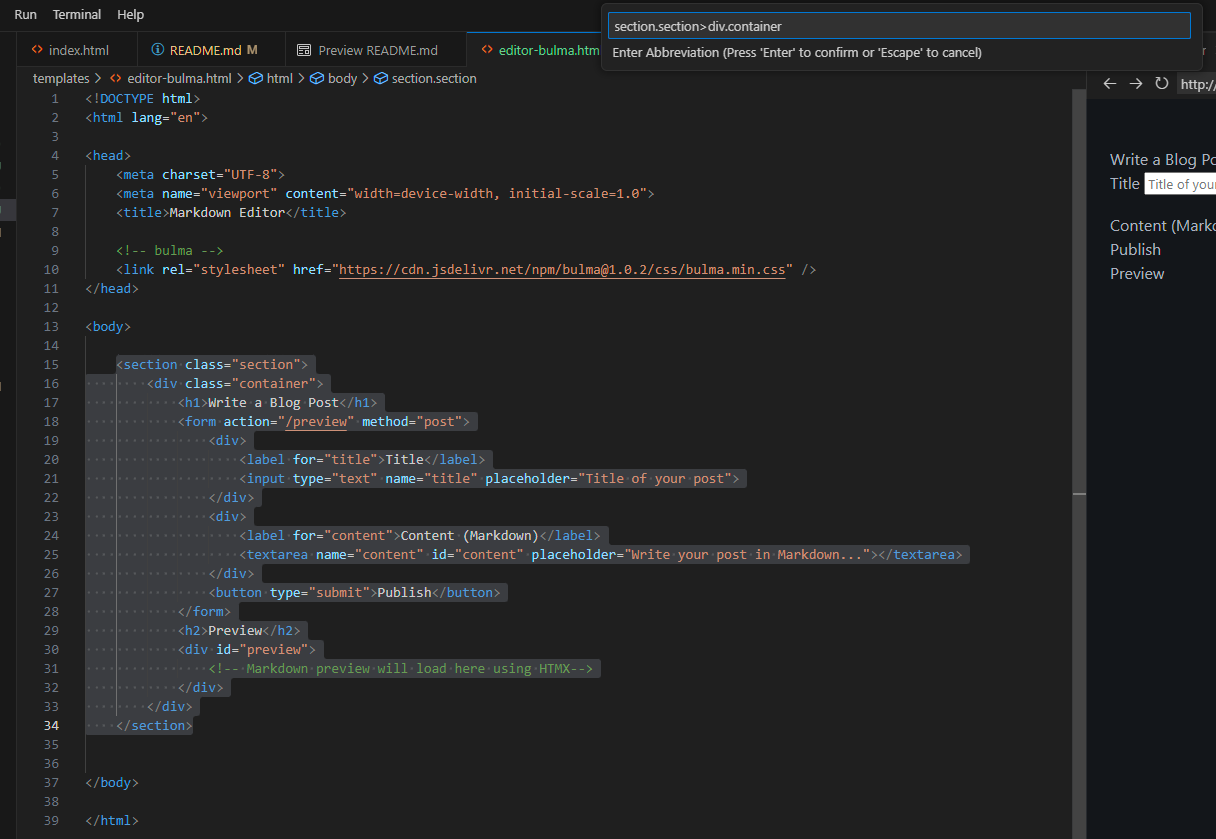
et voila!
corey@gallon.me:~$ tail -f /writing
Attach to the stream.
An email when I have something worth sending.
Replies encouraged!
corey@gallon.me:~$ ls -lt /til
↑2024-11-28
Why An 8TB Drive Isn’t 8 Usable TB
▸2024-11-14
Wrap with HTML tags in VSCode ⋅ you are here
↓2024-10-15
A nice workflow for creating Python projects with AI