dmesg --follow
[ 68429340.000 ] posts.x: Full talk on distilling successful and failed agent runs into reusable skills:  |   [ 68429340.000 ] posts.x: A Chromium fork running inside AWS Lambda succeeded 36% of the time, not exactly production ready. @rafalwilinski, founding engineer at Runlayer…  |   [ 68422380.000 ] posts.x: @andimarafioti Let’s hope not!  |   [ 68402460.000 ] posts.x: Full talk on Gemini's Interactions API and why agents get their own sandboxed environment:  |   [ 68402460.000 ] posts.x: Giving an agent a function result by stuffing it into a "user" turn always felt backwards, since the result comes from the environment, not the user…  |   [ 68395680.000 ] posts.x: @levelsio  |   [ 68395620.000 ] posts.x: @andimarafioti Marital discord as a result of Anthropic A/B testing! 😜  |   [ 68395560.000 ] posts.x: @thekitze What are you printing?  |   [ 68395380.000 ] posts.x: @ThePrimeagen 💀  |   [ 68395260.000 ] posts.x: @0x0SojalSec @CoffeeVectors Open models FTW  |   [ 68333520.000 ] posts.x: Full workshop on what happens inside an inference engine between prefill and decode, from scheduler bottlenecks to speculative decoding:  |   [ 68333520.000 ] posts.x: Training is a cost center. Inference is a revenue center. @charles_irl makes that case the spine of "What Is an Inference Engine, Anyway?", and…  |   [ 68322600.000 ] posts.x: Full talk on scaling databases for AI-driven traffic, covering isolation, sharding, back pressure, and letting agents draft and deploy schema changes:  |   [ 68322600.000 ] posts.x: A couple of months back GitHub's traffic jumped two to four times over what was already massive load, something they pinned largely on AI agents…  |  
corey@gallon.me:~/til$

Debugging Python Tests in VSCode

FIGURE 1 ⋅ Debugging Python Tests in VSCode

VSCode offers native test capabilities that are quite useful. Testing Python in Visual Studio Code

It doesn’t, however, recognize your Python tests by default. You must configure it to do so for each project.

Command Palette (CTRL+SHIFT+P) → “Python: Configure Tests” →

Command Palette Python Configure Tests.png
FIGURE 2 ⋅ Command Palette Python Configure Tests.png

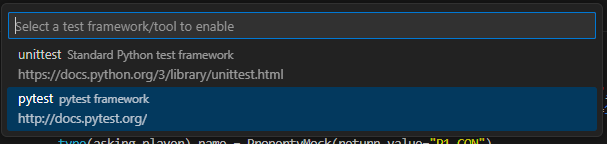
Select the framework you’re using:

Command Palette Select Framework.png
FIGURE 3 ⋅ Command Palette Select Framework.png

Now, you get all of the testy-goodness that VSCode has to offer for Python.

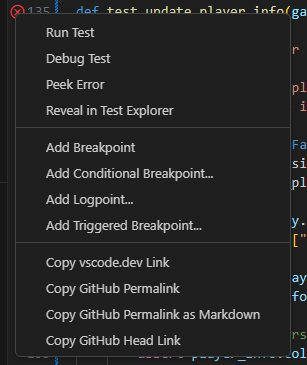
In this case, I wanted to debug a specific test. Super easy! Just drop breakpoints in the test where you want them, then run “Debug Test”.

Right Click Debug Test.png
FIGURE 4 ⋅ Right Click Debug Test.png

The “Test Explorer” is also quite useful.

corey@gallon.me:~$ tail -f /writing Attach to the stream. An email when I have something worth sending. Replies encouraged!
corey@gallon.me:~$ ls -lt /til ↑2024-10-06 raco: Racket's Package Management System (and More)
▸2024-09-15 Debugging Python Tests in VSCode ⋅ you are here

↓2024-09-15 Debugging Python CLI Arguments in VSCode