-rw-r--r--
90 words
1 min2 code blocks5 figures
2024-09-15
Debugging Python CLI Arguments in VSCode

Command Palette (CTRL+SHIFT+P): Debug: Add Configuration

Then, select “Python Debugger”

Then, select “Python File with Arguments”
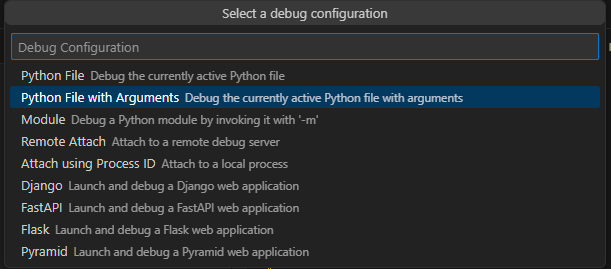
VSCode then creates the .vscode directory in your project, if it doesn’t exist already, and adds launch.json as follows:
{
    // Use IntelliSense to learn about possible attributes.
    // Hover to view descriptions of existing attributes.
    // For more information, visit: https://code.visualstudio.com/docs/debugtest/debugging
    "version": "0.2.0",
    "configurations": [
        {
            "name": "Python Debugger: Current File with Arguments",
            "type": "debugpy",
            "request": "launch",
            "program": "${file}",
            "console": "integratedTerminal",
            "args": "${command:pickArgs}"
        }
    ]
}
If you don’t change anything, when you debug a file VSCode will prompt you for arguments to pass the file every time you run the debugger.

Can also click, bottom right, “Add Configuration” which will stub out adding more configs in the JSON so that you can tailor it to your specific application. For example:
{
    // Use IntelliSense to learn about possible attributes.
    // Hover to view descriptions of existing attributes.
    // For more information, visit: https://code.visualstudio.com/docs/debugtest/debugging
    "version": "0.2.0",
    "configurations": [
        {
            "name": "Blue Horseshoe Debugger",
            "type": "debugpy",
            "request": "launch",
            "program": "${file}",
            "console": "integratedTerminal",
            "args": ["run",
            "--players", "5",
            "--duration", "2",
            "--round-end", "fixed",
            "--config", "strategy_config.yaml",
            "--simulation", "true",
            "--strategies", "conservative,conservative,conservative,momentum,arbitrage"]
        },
        {
            "name": "Python Debugger: Current File with Arguments",
            "type": "debugpy",
            "request": "launch",
            "program": "${file}",
            "console": "integratedTerminal",
            "args": "${command:pickArgs}"
        }
    ]
}
corey@gallon.me:~$ tail -f /writing
Attach to the stream.
An email when I have something worth sending.
Replies encouraged!
corey@gallon.me:~$ ls -lt /til
↑2024-09-15
Debugging Python Tests in VSCode
▸2024-09-15
Debugging Python CLI Arguments in VSCode ⋅ you are here
↓2024-09-11
Suppressing Rich Tracebacks in Typer Apps