dmesg --follow
[ 68692020.000 ] posts.x: Full talk on building a structured query engine for agent context, from schema discovery to self-correcting queries:  |   [ 68692020.000 ] posts.x: When Claude starts a task with no context attached, it behaves like a brand new employee: grepping through the codebase, guessing at what matters…  |   [ 68673720.000 ] posts.x: @davidsenra you will love this!  |   [ 68673600.000 ] posts.x: https://t.co/vhJifvV8y9  |   [ 68673600.000 ] posts.x: This Jay-Z documentary, In 8, is exceptional! Nearly 6 hours of intimate conversation between @sc and the brilliant @RickRubin. It’s rare to get such…  |   [ 68662260.000 ] posts.x: Full talk on turning re-prompted fixes into linters, including the OpenAPI drift fix and the skill-writing whack-a-mole:  |   [ 68662260.000 ] posts.x: Re-prompting an agent to fix the same sloppy pattern over and over isn't a workflow, it's a sign the rule should live in code, not in your head…  |   [ 68650020.000 ] posts.x: ↻ @willcb: me: kinda fucked up how many people are offloading their whole lives to muse or instinct or grokbot or whatever claude: yeah  |   [ 68650020.000 ] posts.x: ↻ @iamdevloper: signs you've become the senior dev: you're the only one who understands the deploy script you're the only one who remembe…  |   [ 68649720.000 ] posts.x: Gooooooooood morning! Brazil Oberon Cerrado. Roasted 110 seconds past first crack. Milk chocolate and almond.  |   [ 68647800.000 ] posts.x: @Saanvi_dhillon “Git expert” is a weird flex, though, isn’t it?  |   [ 68610720.000 ] posts.x: @sujee_dev @dkundel @aiDotEngineer Thanks mate!  |   [ 68600580.000 ] posts.x: Full talk on the Codex app server protocol and what you can build on top of the Codex harness:  |   [ 68600580.000 ] posts.x: A lot of engineers assume building their own agent interface means writing their own agent harness from scratch. @dkundel, Developer Experience Lead…  |  
corey@gallon.me:~/til$

Writing Racket (Scheme) in Jupyter Notebooks

FIGURE 1 ⋅ Writing Racket (Scheme) in Jupyter Notebooks

First, we’re going to install Jupyter. As we don’t want to contaminate our global Python installation, we’ll do this in a venv

python -m venv venv

Now, let’s activate that bad boy:

source ./venv/bin/activate

Assuming you have Racket installed (see previous TIL — NB do not install via the Snap store … use apt!), install the Racket kernel for Jupyter:

raco pkg install iracket

Should your system complain about not having libzmq5 installed:

sudo apt install libzmq5

Then, install the Racket kernel into Jupyter:

raco iracket install

Then, confirm that Jupyter sees the Racket kernel:

❯ jupyter kernelspec list
Available kernels:
  python3    /home/captivus/projects/sicp/venv/share/jupyter/kernels/python3
  racket     /home/captivus/.local/share/jupyter/kernels/racket

Now … we create a new Jupyter notebook in VSCode using the Command Palette:

Command Palette New Jupyter Notebook.png
FIGURE 2 ⋅ Command Palette New Jupyter Notebook.png

In the top right of the notebook, select the kernel (it won’t say Racket when you start):
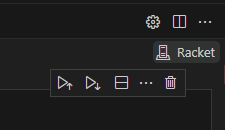
Jupyter Notebook Select Kernel.png
FIGURE 3 ⋅ Jupyter Notebook Select Kernel.png

You’ll be presented with these options:
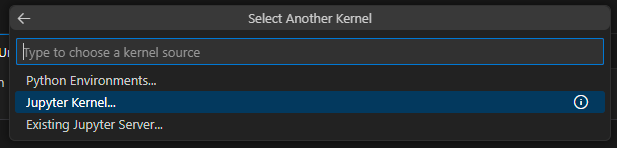
Jupyter Kernel Options.png
FIGURE 4 ⋅ Jupyter Kernel Options.png

Select “Jupyter Kernel”, then select “Racket”:

Jupyter Notebook Select Racket.png
FIGURE 5 ⋅ Jupyter Notebook Select Racket.png

… and you’re up!

corey@gallon.me:~$ tail -f /writing Attach to the stream. An email when I have something worth sending. Replies encouraged!
corey@gallon.me:~$ ls -lt /til ↑2024-10-06 Working through SICP in Jupyter Notebooks
▸2024-10-06 Writing Racket (Scheme) in Jupyter Notebooks ⋅ you are here
↓2024-10-06 raco: Racket's Package Management System (and More)